The trick is to treat ChatGPT like a really smart intern.
Over the past two months, a team of four writers and I have gathered case studies on how generative AI has been successfully applied across various industries.
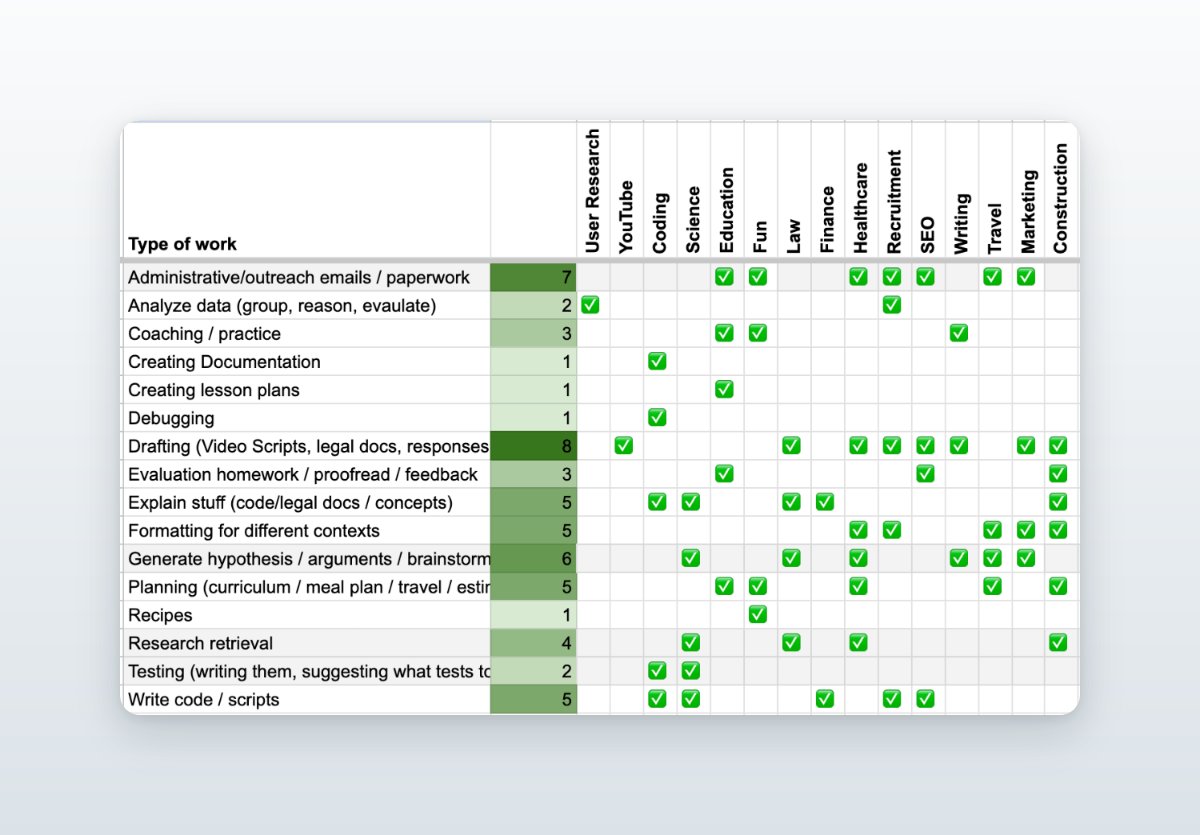
Of the 16 different types of work it gets used for, in over 15 different industries, we learned that the two most useful ways it gets used are drafting content and brainstorming ideas.
I’m going to focus on the drafting bit in this post since it was the most useful application by a long shot. My claim is that if your business produces anything that is eventually meant to be read, GPT can help you do it better and faster.
Drafting covers anything from writing job descriptions and legal agreements to blog posts and administartive emails, writing website copy and Facebook ads, creating lesson plans or travel itineraries, and designing recipes.
I should point out that AI can, and often does, produce incorrect information. It’s crucial to fact-check the output. Using ChatGPT to draft an important legal contract, and not having a lawyer look over it before you use it, is a bad idea. The way to use ChatGPT correctly is to think of it as a really smart intern—capable of completing complex tasks but still requiring guidance and oversight.
The content GPT produces out of the box tends to be aggressively average. If you need better than average, then you need to bring some kind of process for ChatGPT to follow, just as you would with an intern. If you’ve been writing fantastic Facebook Ads for years, it is unlikely that ChatGPT will be able to write a better Facebook ad than you. However, if you meticulously break your process down into explicit steps and you use ChatGPT at each step, then ChatGPT will be able to help you write much better Facebook ads faster than you could before.
The better businesses get at documenting their process for producing the things they create, the easier it will be for them to leverage AI for a competitive advantage.
What about using AI for SEO?
Content marketing is a whole sub-section of drafting content that deserves a mention. People have been trying to figure out how to use AI to generate blog posts to get traffic from search engines from the moment it was possible. Initially, there was a competitive advantage in using AI-generated content because only a few people knew it was possible. This came to an end when Jasper, an AI content writing web app, became one of the fastest-growing private companies in America.
The shift in awareness around AI content generation meant that people started getting concerned about Google penalizing AI-generated content material. Google officially said it’s ok to use AI-generated content as long as the content was genuinely useful to people. That said, Google has updated its rater guidelines to include Expertise as one of its main rating criteria. This means that relevant first-hand experience about whatever you are writing about is a primary ranking factor now.
Google guidelines aside, relying on GPT to write a full-length article from scratch is not ideal. Even if you could get it to say something that wasn’t generic about a topic, everyone else has access to the same tool and can just as easily churn out content of the same quality.
Building on the smart intern metaphor earlier, the best way to use AI for content creation is to think of it as a reasoning engine. This metaphor helps because it distinguishes knowledge from reasoning. Instead of relying on AI to provide the expertise, it’s your job to figure out what you want to say and support your claims. You bring the knowledge, and ChatGPT will help you figure out how to communicate it.
The good news is that if you don’t have expertise in a domain, ChatGPT makes it really easy to learn things and develop expertise rapidly.
Evaluations – GPT can help you evaluate good or bad output based on specific criteria. I’ve used this approach to evaluate blog posts against Google guidelines for great content. Google has a list of self-assessment questions for writing great content. Instead of just asking GPT to give me feedback on the blog post, I ask how the post measures up against each of the self-assessment questions. To check out how I structure the prompt for this, read this.
Summaries – GPT excels at summarizing research papers or distilling articles down to their essence and key claims, which makes it easy to triage lots of reading material quite quickly.
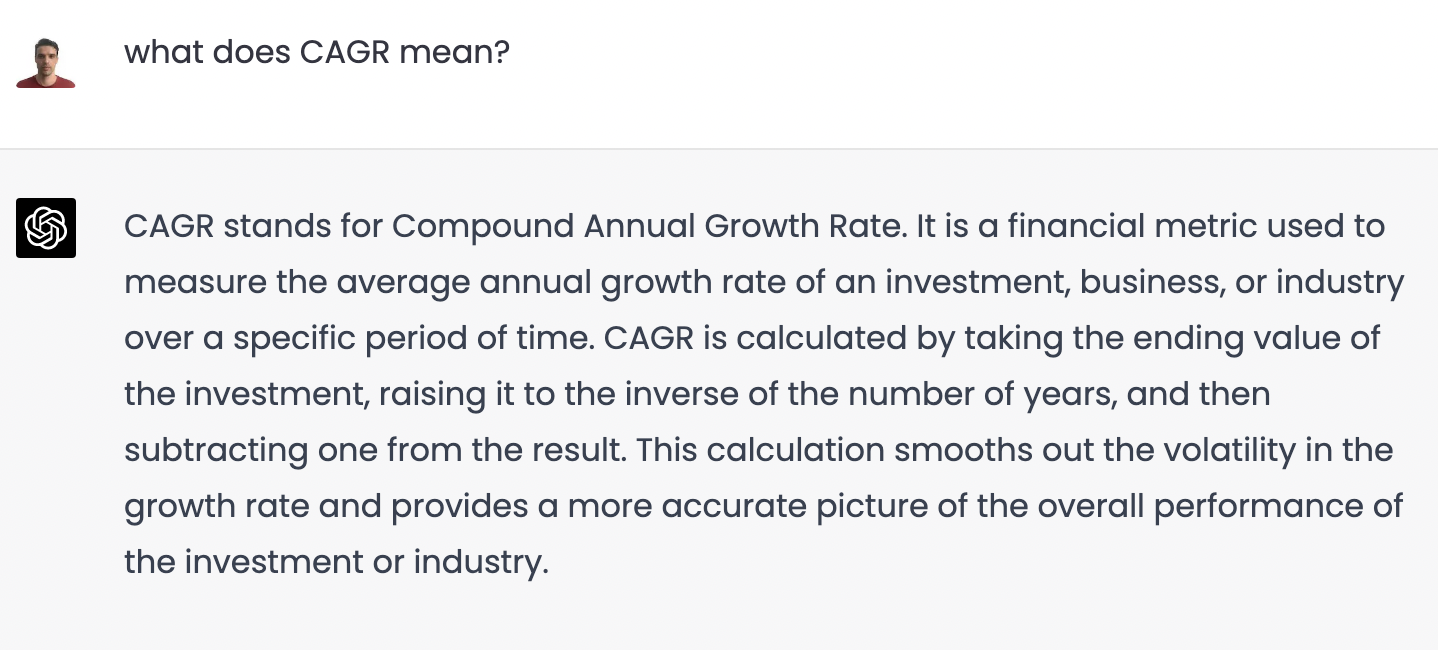
Explanations – It’s also great at explaining complex concepts and providing context around ideas. I was learning about the waste management industry the other day and I didn’t understand why sector growth information was depicted in CAGR.
Organization – If you have a collection of notes and thoughts, GPT is great at organizing notes into a coherent argument or outline. Using GPT to create a preliminary draft or outline of something is great for getting unstuck and blasting through bouts of procrastination.
Tool use – Another interesting way GPT helps with learning is that it makes using other tools really easy. I often just ask GPT to show me what formula I need when I’m trying to do something complicated in Excel or Google Sheets. You can extend this to almost any kind of product by copying the relevant section of documentation into the prompt and then just asking it to show you how to do what you want to do.
In summary, if your business produces anything that is meant to be read, it is highly likely that AI can help streamline and standardize the process. If you just need something average, then ChatGPT has you covered. If you need something done well, then you need to break down your process for doing it into discrete steps and show GPT how to do each step.
 Josh Pitzalis