Want to put more energy into your blog this year?
Maybe even figure out how to use AI to help create and distribute your content.
AI is fantastic for repurposing content, but rubbish at creating new content.
This post will explain why…and exactly how to start repurposing your own content.
Last October, I started a 30-day AI-assisted content challenge.
4 of us tried out as many prompts and tools as we could find with the goal of creating useful content for our project or business for 30 days.
By the second week, everyone gave up.
https://x.com/joshpitzalis/status/1714569976596586533?s=20
What I realized from the experience is that good writing relies on details.
You make a compelling point. Then you back it up with some detail. This could be data, or a story, maybe an explanation, or share an example, you could show me how, but give me something.
On the other hand, shitty content makes a bunch of points and then doesn’t back anything up. It never slows down to get into the details of what it’s talking about. One claim after another, without any evidence whatsoever.
The first article I wrote was almost entirely AI-generated.
https://twitter.com/joshpitzalis/status/1714925988851692022
But when it came to the examples section, it just had placeholders (example 1, example 2…). It didn’t even try!!!
So AI was great for shitty writing. The kind of writing no one wants to read.
I can get an impressive draft of what I want to talk about… but then I have to add all the specific details and references so that people can take what I’m saying seriously.
Asking AI to come up with evidence or anecdotes was useless. The best it could do was give you a bland hypothetical example. Adding in actual research and rich details that make a story worth experiencing is what makes all the difference.
Finding these specifics requires reading, listening, digesting, doing things in the real world, documenting your experiences, learning how other people did stuff, getting in touch with them if you can…
All stuff that takes ridiculous amounts of time.
By the second week, making readable content with AI meant spending twice as much effort reading and researching than writing.
Nobody was saving themselves any time. So we cut our losses.And I decided to see if I could use AI to repurpose content instead.
If I put the time in and created a great piece of content, could generative AI help me repurpose and distribute the content over a bunch of different social media channels?
Julia and I decided to try and answer this question together. Julia runs a podcast called the Creator Files, and she’s a big part of Project 24 (A community that helps people build an income from a new blog or YouTube channel over a 24-month period).
Here’s the creator files podcast episode where we figure out how we’re going to approach this repurposing project together.
The main problem we wanted to tackle was the fact that when you repurpose content for different platforms, you can’t just copy and paste the same content on every channel.
Each platform has its own idiosyncrasies. What works as a Twitter thread won’t always work as a Reddit post. Was it possible to hand AI the source content and get snippets tailored to each different platform?
We started with a baseline prompt where we fed ChatGPT a blog post and asked it to repurpose the content for Twitter, LinkedIn, Facebook, and a newsletter.

The idea was to look at the baseline result and ask ourselves if we would use it. I mean, what’s the point of spending a whole project on this if a single prompt did a good enough job out of the gate?
The result was both impressive and disappointing. Impressive in that it managed to figure everything out and get the job done, but disappointing in how cheesy a lot of the writing was.
The final approach we arrived at to get something we were happy to use involved 3 separate steps:
Building a community profile that accurately described the people we were repurposing the content for.
Splitting the original piece of content into each of its core ideas.
Putting together more detailed instructions for each of the social media platforms we wanted AI to repurpose content for.
This approach gave us a significantly better output than the baseline prompt but was still a quick enough process that we could create weeks worth of content in about 20 minutes.
Here are the prompts we used for each of the steps…
Building a community profile
Instead of just specifying we wanted to repurpose the content for “bloggers”, I went to the Project 24 community forum and found a handful of popular threads.
The goal was to build a blueprint of what people in that community cared about based on actual discussions they were having.
For each of the threads I selected, I used the following prompt to map out common themes in the discussion.
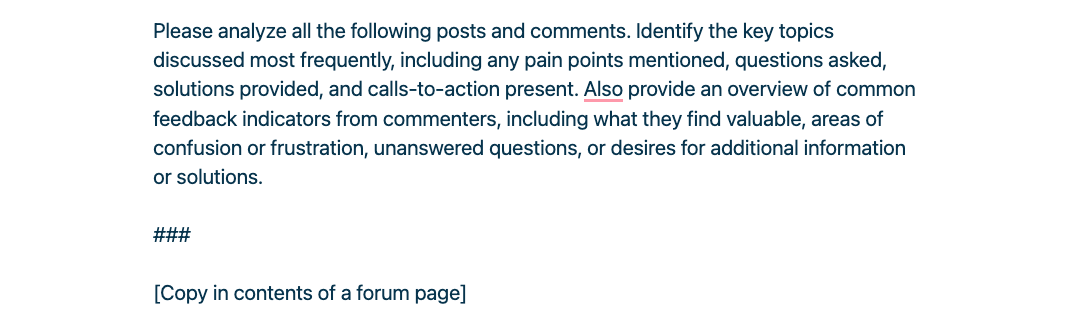
Once I had 5-6 lists of the most themes from the community I merged them all into a single community profile that we could use in the next set if prompts.
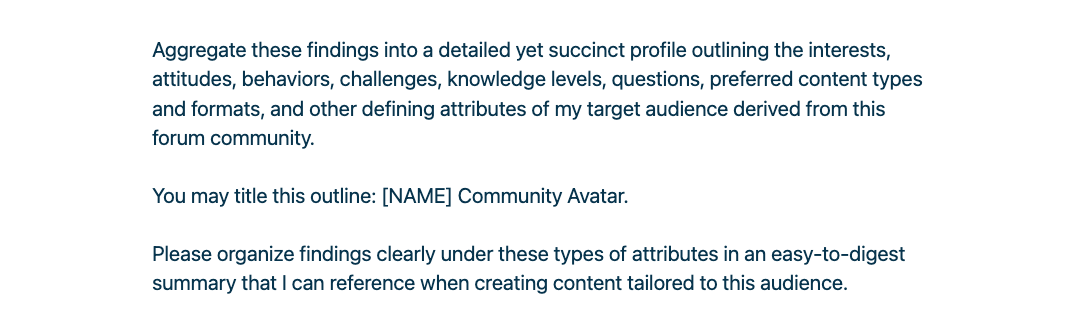
The exact wording of the prompts isn’t that important, please improve on it.
But building out a comprehensive map of what your target audience cares about made a difference to how it would repurpose content, which ideas it would fixate on, the language it would use and so on.
There is a whole episode on the Creator Files Podcast where Tristan Goodwin explains how he builds community profiles from the comments section on YouTube video.
Definitely worth a watch if you have more questions about all of this.
Splitting content into its core ideas
If you’re repurposing an entire podcast transcript into a social media post it’s going to be impossible to get all of the ideas discussed into a single social post.
The longer the content you’re trying to repurpose the harder it gets.
A better approach is to demarcate each of the core ideas in your content and then dedicate a separate social post to express each one.
This give each ideas more space to breath and results sharper, more focused social posts.
It also means you can get a lot more social posts out of a single piece of content.
If you split an article up into six core ideas and express each one on five different social platforms, that’s 30 pieces of great social content in less than 20 minutes.
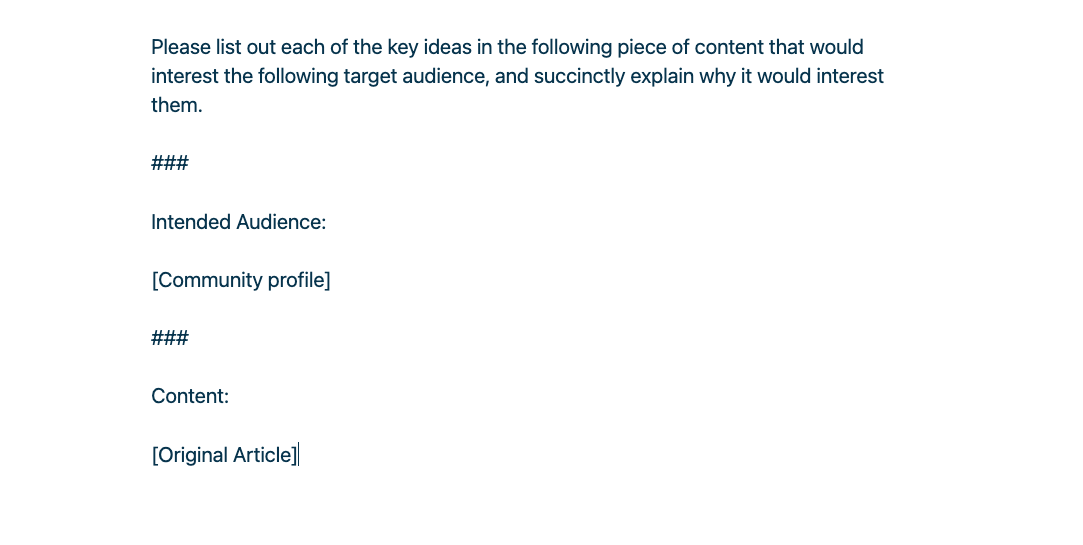
You use the community profile we just put together to get ChatGPT to split a piece of content up into the core ideas, as they relate to the audience you are writing for.
This does a better job of drawing a boundary around the most relevant themes for your audience, rather than just building a generic table of content.
Here’s the prompt I’ve been using to do this so far…
🗣️ Platform idiosyncrasies
Last step, figuring out specific instructions for repurpose content on each of your social media platforms.
The instructions for writing a good Twitter thread are going to be different from how you’d approach write a good newsletter update.
If you rely on ChatGPT to figure this out on it’s own, the first few attempts are usually quite cringy.
The key is to treat ChatGPT like a smart intern.
Put the same attention into creating useful instructions and providing helpful feedback and as you would for a person.
If you get a cringy result from the baseline prompt, tell it why you think it’s cringey.
Give it a few examples of what a good Twitter threads look like.
Then explain what you like about them.
Lay down clear principles for how to think about creating content on the platform.
Here is the prompt I’m using for Twitter threads at the moment.
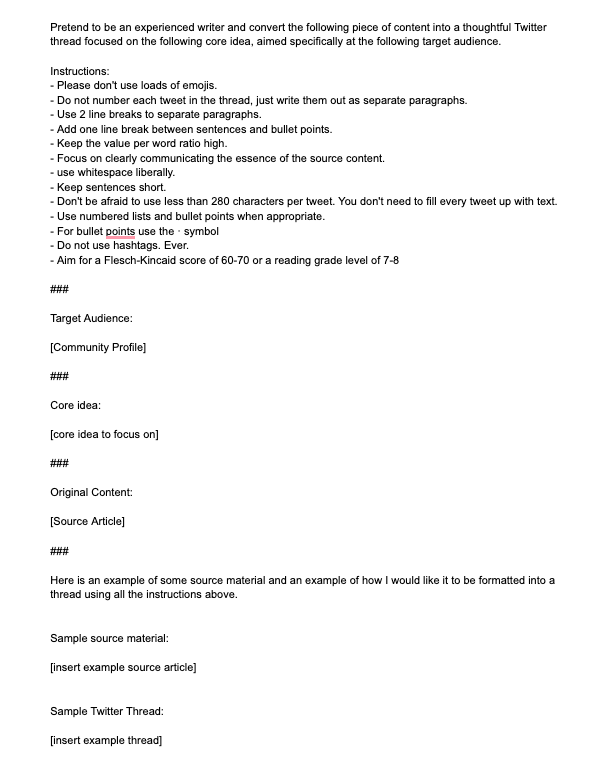
It has a list of formatting instructions, a community profile, a core idea to focus on, and an example of the kind of output I’m looking for.
It’s important to understand that I didn’t figure this all out in one go. I started with the baseline prompt and then added to the instructions each time I used to gradually narrow in on how I like Twitter threads to be written.
I also incorporated ideas on how to write Twitter threads from Rob Lennon, Josh Spector, Erica Schneider and Katie Wight. If you have guides and courses on how to write for a specific social platform then use the principles you like in your prompts.
If there aren’t lots of great resources for your platform (for example, we didn’t find much on how to write great youTube community posts) then you can start with the baseline prompt and give ChatGPT feedback and examples to iteratively build up your ideal set of instructions.
Again, the key is to give this process the same amount of time and attention as you would with a real person.
You only have to figure your instructions out once and then you can reuse them again and again to effortlessly repurpose content for each of teh platforms you want to focus on.
This is the approach that worked for us.
Build a community profile.
Use the profile to split content into its core ideas.
Turning each core idea into a social post with a different set of instruction for each social platform we wanted to focus on.
The exact prompts probably won’t be the best fit for your style of content. But you can build on the prompts and tailor the overall approach so that it works for your type of content and the platforms you want to focus on.
The takeaway for us was splitting a complicated task like repurposing content into discrete steps. Spending time to come up with a thorough prompt for each of step. And then chaining the results together to create a custom workflow for the way we wanted our content repurposed.
As opposed to trying to stuff the entire repurposing process into a single mega prompt.
I doubt there is a “correct” way to do this. But breaking the process into a series of specialized prompts and chaining them together worked better for us, for this type of complex task.
In conclusion, I don’t think we will ever have a great general-purpose tool that repurposes content for you. There will always be a need to calibrate it to your specific type of content, what your audience expects, and changing expectations on different social platforms. So take a week and put together a repurposing process that works for your content, your audience and the platforms you want to focus on.
 Josh Pitzalis